Open WebUI review: what the license lets you ship to a client
Open WebUI puts a ChatGPT-style front end on a client's own models in one container. Here is what it runs on, what the branding clause costs you, and how LibreChat and Dify compare.
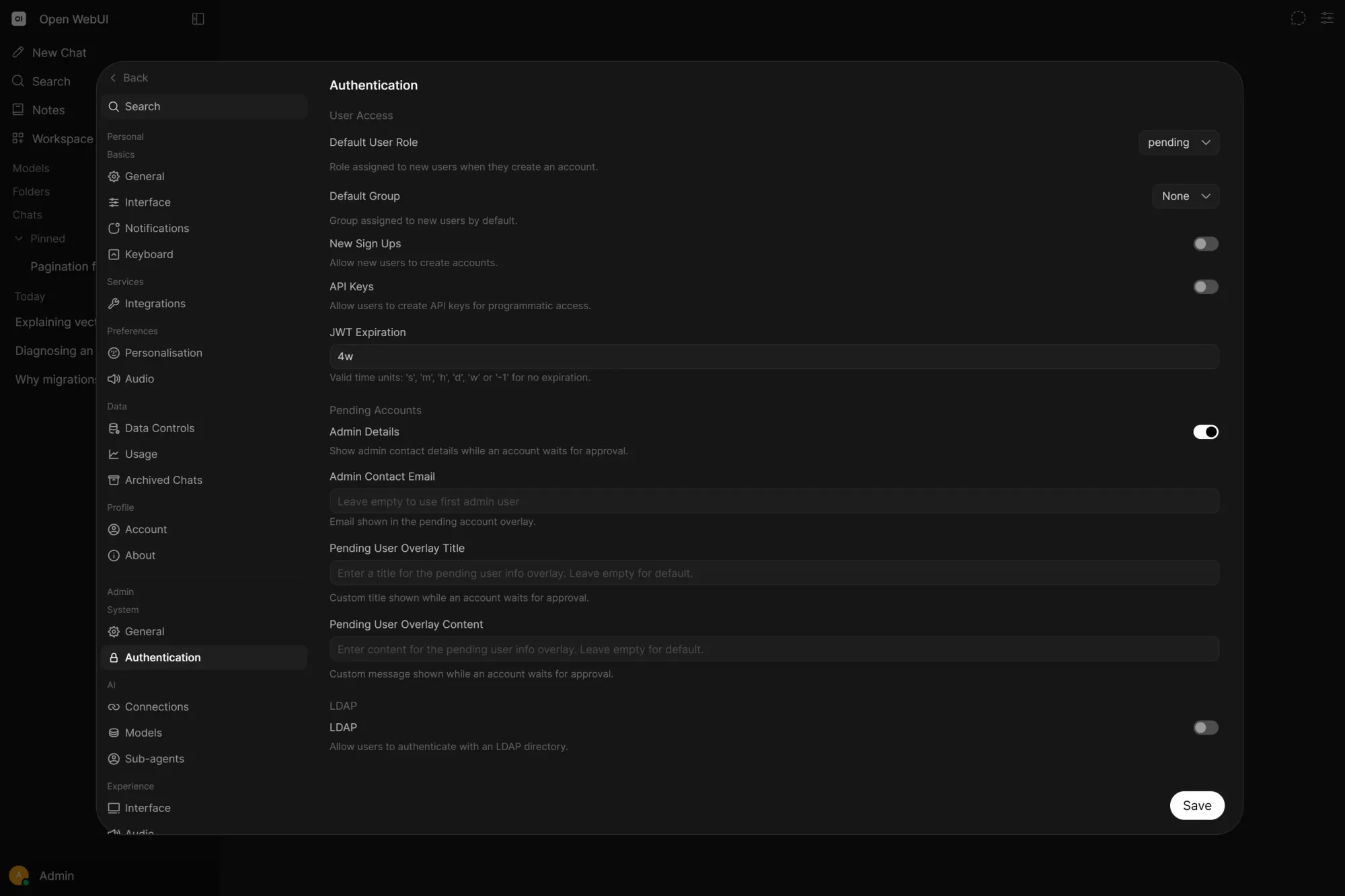
Open WebUI is a self-hosted chat front end for AI models. You run one container on your own hardware, point it at Ollama on the local network or at any OpenAI-compatible API, and the people you hand accounts to get a ChatGPT-shaped window onto those models. For delivery work the benefit is concrete: the assistant you sell sits on the client's server, reads the client's files, and keeps conversations inside their network instead of a vendor account. The part you must read before you quote the job is the license. The source is free to download and run, and since version 0.6.6 the terms protect the words "Open WebUI" in any deployment above fifty end users.
The repository is open-webui/open-webui. The GitHub API on 18 November 2026 counted 159,021 stars, 23,110 forks, a creation date of 6 October 2023, a last push on 18 November 2026, Svelte as the top language, and a license field reading NOASSERTION, which is GitHub's way of saying it does not recognize the license as a standard SPDX one. Behind that field sits a BSD-style license with a branding condition attached. The nearest permissive rival, LibreChat, holds 47,321 stars under MIT. Dify, a different shape of product, holds 161,429 under a modified Apache license. The vendor's front page counted 477M+ downloads and 537,342 community members on 18 November 2026, its own counters rather than a neutral one, and the release feed showed v0.13.4 published the day before that last push.
What the license really allows
The LICENSE file opens with a BSD-3 style grant held by Open WebUI Inc., credited in the README to Timothy Jaeryang Baek, and clause 4 adds the condition that matters to a studio. Licensees may not alter, remove, obscure or replace Open WebUI branding in any deployment or distribution, with three exceptions: deployments where "individual natural persons with direct access to the application" do not exceed fifty within any rolling thirty day period, deployments with prior written permission, and deployments under a signed enterprise license. Anything else counts as a material breach. The documentation states the rule plainly: branding requirements "only apply to larger deployments (50+ users, aggregate)", and an internal deployment of fifty or fewer "may fully rebrand if they choose". The clause arrived with v0.6.6, announced on 19 April 2025. Earlier code stays under MIT and BSD-3, and the docs invite anyone to copy the tree at v0.6.5 and build from there with no conditions. The same page concedes that OSI has not approved the license since v0.6.6, so write "source available with a branding condition" in your proposal.
The job this lands on
A retainer client wants an internal assistant over their policy PDFs and their old support tickets, under their brand, with staff accounts and the data kept at home. A consumer ChatGPT subscription fails the brand test and the data test. A managed platform brings a bill that grows per seat and an export path you have to ask about. Open WebUI fills that hole: one container, the client's network, real accounts, files in a folder you own. The uncomfortable question waits at the handover meeting. Who can read which conversations, whose name sits in the sidebar, and what happens to the white-label promise when the client hires their fifty-first person.
What the tool does beyond the chat box
The docs call the platform "a home for AI" and treat the instance as multi-user from the first start, with roles, groups and per-resource permissions, nested groups, a default model per group, and a "sign out all devices" action for a departed employee. Knowledge bases hold uploaded documents and folders with embeddings, reranking and citation tracking, and web search is a pluggable backend. The same instance ships notes, channels, image generation, voice, Python functions and pipelines, and Open Terminal, which gives the model a sandboxed computer for commands, file edits and coding agents. The community library at openwebui.com distributes functions and tools written by other people, so work you did for one client installs at the next.
What you install and what it needs
Three documented paths: pip install open-webui on Python 3.12, one Docker container from ghcr.io, or the desktop app in the open-webui/desktop repository, with the docs recommending Docker or Python for anything in production. The image tag decides the shape of the install. :main bundles embeddings, document extraction and speech. :slim is the same interface at 197 MB against 1.62 GB, with about 300 MiB of RAM at idle, figures the docs measured on 16 October 2026 from v0.12.3 on Linux and arm64 with no concurrent users. Slim hands embeddings, extraction from scans, speech and web search to outside services, and needs PostgreSQL with pgvector. Storage defaults to SQLite inside the data volume and moves to PostgreSQL for a shared instance. Two settings belong in the compose file before a client sees the login page. WEBUI_SECRET_KEY needs one fixed value, otherwise every recreated container logs everybody out. WEBUI_AUTH=False gives a single-user instance, and the docs warn that switching back to multi-user afterwards is a manual database operation with real risk of data loss. No GPU or VRAM minimum for the front end appears in the documentation, so any sizing figure for it stays unverified.
Accounts, data and whether the client can take it over
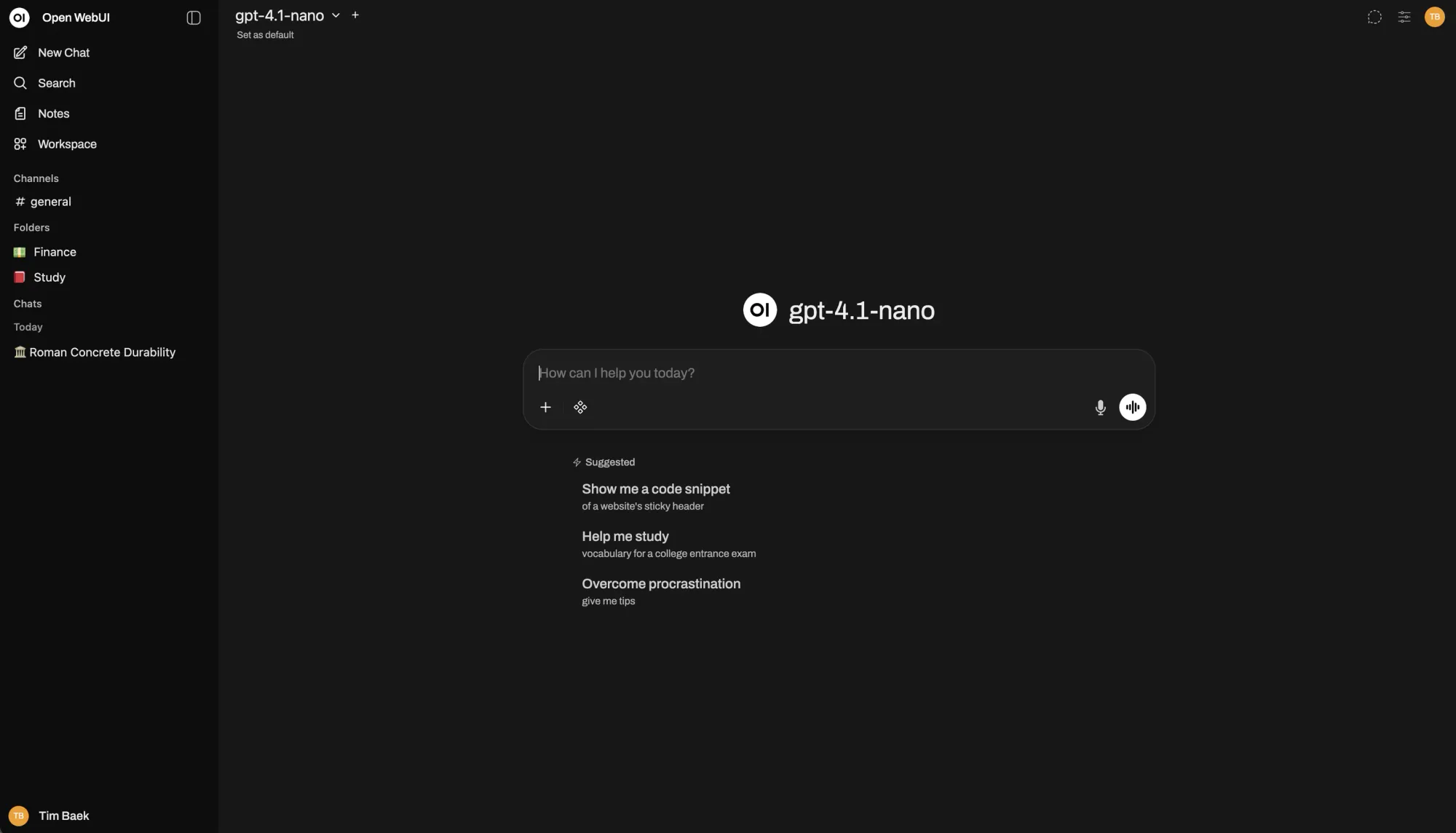
Everything the client owns lives in one place: the open-webui Docker volume, which holds the database, the chats, the users, the admin configuration and the uploaded files. The updating guide's backup recipe is a tar of that volume, and its restore recipe replaces the volume contents, so a client can carry out the handover without you once the commands are written down. Before anyone signs up, the admin panel sets the shape of the tenant: default user role, default group, whether new sign-ups are allowed, whether users may create API keys, how long a JSON web token stays valid, and whether new accounts wait for approval. One limit belongs in the proposal stage. The pages read for this article do not document a per-user export of chat history, so "the client can export everything" gets tested in staging instead of sold. Two capabilities sit on the enterprise side: Terminals, a sandboxed computer per person or per chat, and Tether, which connects a user's own machine to the instance. Anything built on those two depends on a commercial agreement, so a client's automation belongs on the community features when the goal is a takeover they can afford.
How the three compare
| Open WebUI | LibreChat | Dify | |
|---|---|---|---|
| What the project says it is | Documentation: a self-hosted AI platform and "a home for AI" for Ollama and OpenAI-compatible APIs, built to run offline (docs.openwebui.com, 18 November 2026) | README: a "self-hosted AI chat platform" that "unifies all major AI providers", current release v0.8.9 (18 November 2026) | The repository's compose stack runs a web console, an API, a worker, a plugin daemon and a code sandbox, which is an application platform rather than a chat client (docker/docker-compose.yaml, 18 November 2026) |
| License and what it restricts | "Open WebUI License", GitHub tag NOASSERTION: BSD-3 style plus a branding clause. Above fifty end users in a rolling thirty days you may not remove or replace the name and logo without written permission or an enterprise license (LICENSE, 18 November 2026) | MIT: no branding condition, no tenant condition (GitHub API, 18 November 2026) | Apache 2.0 with added conditions: no multi-tenant service without a written commercial license, and no removal or change of the logo or copyright in the frontend (LICENSE, 18 November 2026) |
| Where it runs | Docker images :main, :slim, :cuda, :ollama, :dev, plus Python 3.12, Kubernetes and a desktop app (README and quick start docs, 18 November 2026) | Docker Compose stack, and a Node application you can configure through .env and librechat.yaml (repository files, 18 November 2026) | Docker Compose (docker/docker-compose.yaml, 18 November 2026) |
| What it needs to run | One container and one volume; SQLite by default, PostgreSQL for a shared instance, Redis only for multiple replicas, optional object storage and pgvector (quick start docs, 18 November 2026) | MongoDB (MONGO_URI in .env.example) plus the services named in the compose override example: api, mongodb, meilisearch (18 November 2026) | postgres:15-alpine, redis:6-alpine, nginx, a plugin daemon and a vector store such as Weaviate, Qdrant or Chroma (docker/docker-compose.yaml, 18 November 2026) |
| Accounts and admin controls | Roles, groups and per-resource permissions, MFA, OIDC and OAuth, LDAP, SCIM 2.0, API keys, pending-account approval (docs Authentication & Access, 18 November 2026) | Browser admin panel for users, groups, roles and live configuration overrides; OAuth2, LDAP and email login (README, 18 November 2026) | Not verified for this article |
| What you maintain afterwards | Image tag choice, one-way database migrations, WEBUI_SECRET_KEY, Python functions and pipelines you wrote (updating guide, 18 November 2026) | Not verified for this article | Images are pinned by version, api and web at 1.20.0 released on 18 November 2026; migration and plugin update policy not verified for this article |
| Open items in the tracker | 216 open issues, 242 open items including pull requests (GitHub API, 18 November 2026) | 563 open issues, 1,216 open items including pull requests (GitHub API, 18 November 2026) | 641 open issues, 1,446 open items including pull requests (GitHub API, 18 November 2026) |
| Stars, forks, last push | 159,021 stars, 23,110 forks, pushed 18 November 2026, opened 6 October 2023 | 47,321 stars, 9,743 forks, pushed 18 November 2026, opened 12 February 2023 | 161,429 stars, 25,523 forks, pushed 18 November 2026, opened 12 April 2023 |
| Price of the paid tier | No public price list in the documentation on 18 November 2026, contact sales | Not verified for this article | A pricing page is linked from the repository README; the page was not opened for this article, so no plan or figure is verified |
| Best fit | One chat instance per client, over that client's own models and files | A client who wants many cloud providers in one UI under a license with no strings | A client who wants an assistant built and run as an application, with workflows and a plugin marketplace |
Three cells stayed open, and each closes with one page. The Dify column has no verified account model, so read the access control and workspace pages at docs.dify.ai before you compare permissions. The LibreChat column has no verified maintenance story and no verified price, which the deployment and pricing pages at librechat.ai answer. The "best fit" row is my judgement over the sourced cells, and the Dify price cell needs that pricing page read on the day you write the proposal.
What it costs and how it is packaged
The free tier is the whole product: the same code and features, with the branding condition attached and no seat billing. The documentation carried no public price list on 18 November 2026 and sends larger deployments to sales, so any figure in your proposal comes from a call and carries a date. The enterprise pages show the shape of the offer: custom branding, support with a service level agreement, long-term-support images, enterprise-only plugins, deployment help, and Terminals and Tether as enterprise features. The partner page is the detail that bites a studio. It tells agencies and resellers not to contact enterprise sales directly, says such mail may go unanswered, points to a partnership form, and states that companies under five years old are generally not eligible except in exceptional cases. If the client will buy immediately, the documented path is an introduction carrying your agency details, the client's company name and work email domain, and the expected seat count. That seat count is the number the license turns on.
What breaks between one version and the next
Upgrade risk is the maintenance cost nobody quotes. The updating guide separates the :main rolling tag from a pinned version tag and says :main can carry breaking changes without warning. Database migrations are one-way: rolling the container back does not roll the schema back, so recovery means a volume backup taken before the update. Several replicas cannot be updated one at a time across a release that changes the schema, since the migration moves the whole database forward while old replicas query the old shape. The v0.13.4 notes from 17 November 2026 show what one release moves: Direct Connections removed in favour of Tether, image generation variables converted into admin-managed connections at first start, and the legacy custom terms model replaced by Termslots with a migration. An instance pinned half a year ago can need admin rework rather than a restart. Mitigation is dull. Pin a version, keep a second instance on :dev with its own volume, back up before every upgrade, search the release notes for the word "migration", and test on the staging copy. The guide also notes that the original Watchtower image is unmaintained and fails against Docker 29+, so check which image your automation runs.
A recipe for running it on a client project
1. Decide the tenant boundary in writing before you install. The license counts end users with direct access across a rolling thirty day window, so seat count is a contract term. Record the number and who counts as an end user. 2. Install a pinned tag with a named volume and a fixed WEBUI_SECRET_KEY, and commit the compose file to a repository the client owns. Leave the key out and every update produces a logout incident. 3. Close registration before the first user arrives: New Sign Ups off, Default User Role below admin, Default Group set, Pending Accounts on so you approve people by name. 4. Wire the identity the client already runs, OIDC or LDAP, and choose the model path in their presence, Ollama on their hardware or a named OpenAI-compatible endpoint, with a note of which data reaches which endpoint. 5. Hand over a runbook holding the volume backup command, the restore command, the pinned tag in use, and an upgrade window in which the release notes get read first.
Who should not use it
LibreChat wins on paperwork. MIT, no branding clause, no tenant clause, an admin panel that manages users, groups and roles, so a client who wants your logo on the box and expects to pass fifty people is a cleaner job there. Dify wins on shape. An assistant packaged as an application, with workflows, a plugin marketplace and versioned images, sits in a different category, and the table shows how much more a Dify stack asks you to operate. Dify's license pushes back the other way, since it bars a multi-tenant service without written authorization and bars removing the frontend logo, so a studio reselling hosted tenants to several clients signs a commercial agreement with LangGenius first. Skip Open WebUI when the requirement is a fully white-labelled product at scale with no budget for an enterprise agreement, and take the v0.6.5 fork path or LibreChat instead. Skip it when the client will not fund an upgrade routine, because migration risk becomes your unpaid weekend. When the deliverable is an automation platform rather than a chat room, read the Dify and n8n pieces in this batch before you commit.
Questions you get asked before installing
Is Open WebUI actually open source? Yes for the code and free to run, but the license since v0.6.6 carries a branding condition OSI has not approved, and the documentation says so itself. Code from v0.6.5 and earlier stays BSD-3 or MIT, and the project invites anyone to fork from that point without conditions.
Can I put the client's logo on it instead? Only in three cases: fifty or fewer people with direct access in a rolling thirty day window, written permission, or an enterprise license. The name in the sidebar and the identifiers listed in the repository's BRANDING.md file are what the clause protects.
Does it work with no cloud API at all? Yes, and the documentation treats it as the normal case. Ollama on the local machine or the local network supplies the model, and the :main image ships its own embedding, extraction and speech models, so retrieval and voice work offline. The :slim image trades that away for a 197 MB download and needs outside services.
What does the client need in order to take it over from me? One Docker volume, the compose file, the WEBUI_SECRET_KEY, the admin account, and the model endpoint they own. The updating guide's backup and restore commands run against that one volume, which is what makes the handover a one page runbook.
What breaks when a new version lands? Migrations, which are one-way, and settings that move or change name. In v0.13.4 the image generation variables became admin-managed connections and the custom terms model was replaced, both with migrations. Pin the tag, back up the volume, read the release notes.
Open WebUI or LibreChat for a client job? Open WebUI when the work is retrieval over the client's files, functions and terminal work in one free package. LibreChat when the client wants many cloud providers behind your brand with no license conditions attached. Seat count and the rebranding promise decide it more often than the feature lists.
The GitHub API figures quoted above were read through the official API on 18 November 2026, and every other figure comes from a page opened the same day. Re-read the license, the release notes and the seat count with the client before you promise a rebranded deployment.
Comments