Webstudio for client websites: what changes when you own the builder
Webstudio is an AGPL open source visual builder. How web studios use it for client sites, how it compares with Webflow and Framer, and what changes when you own the hosting.
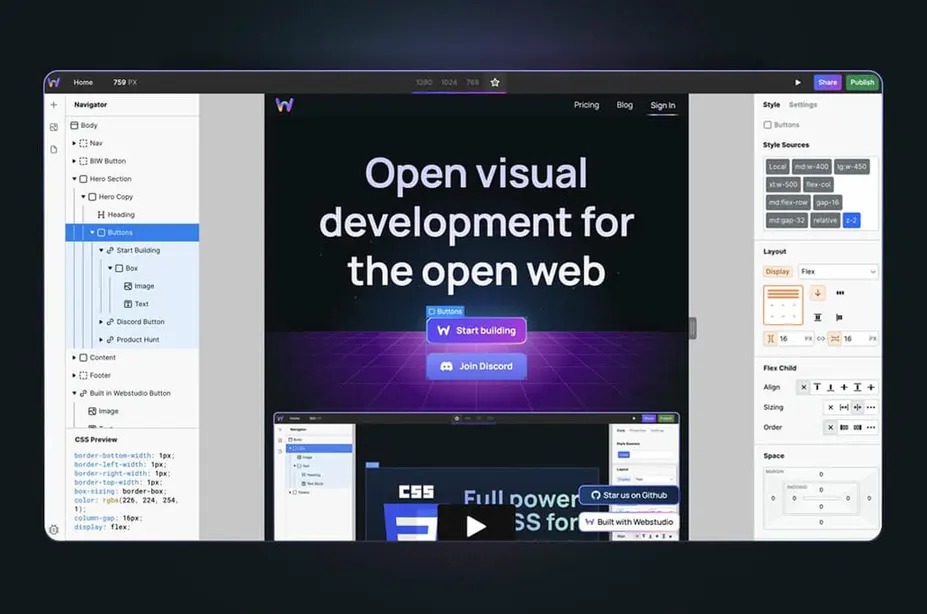
Webstudio is a visual website builder whose core is open source under AGPL-3.0-or-later. It exposes CSS in the interface the way Webflow does, takes content from any headless CMS or from plain Markdown files, and publishes either to Webstudio Cloud or to infrastructure you rent yourself. That last clause is the commercial one. A client site built in Webstudio can move to the client as code, without asking a platform for permission.
Start with the market context, because it explains why anyone argues about this at all. The Webstudio repository went public in March 2022, is written in TypeScript, and showed 9,176 stars and 1,636 forks on 18 November 2026 according to the GitHub API. W3Techs counted Webflow on 1.2% of all websites whose content management system it could identify, and Framer on 0.3%, in November 2026. Among companies in Y Combinator's 2024 and 2025 batches, 13.7% used Framer for their homepage against 10.2% for Webflow, according to an installmap survey from September 2026 cited by Wikipedia. So the two shelves a studio already knows are the incumbent and the fast riser. Webstudio sits on a third shelf: the builder you can run yourself.
What Webstudio is, precisely
The vendor describes it as an advanced visual builder that connects to any headless CMS, supports all CSS properties, and can be hosted anywhere, including with them. The license detail belongs in an agency contract: all functionality in the public repository is AGPL-3.0-or-later, while one optional package, the animation components, sits under a proprietary Webstudio EULA. You publish to Webstudio Cloud, or you export the project and run it somewhere else.
The current positioning is a builder for agents and humans. You let an agent draft, you review the work in the visual editor, then you publish to the cloud or export and self-host. That one sentence is the whole pitch for a studio.
How the three compare
| Webstudio | Webflow | Framer | |
|---|---|---|---|
| Category, per W3Techs | Open source visual builder plus an optional cloud service | Hosted website building service | Online website builder |
| Public source code | Yes. Core under AGPL-3.0-or-later, TypeScript repository since 2022 | Closed platform | Not verified for this article |
| Where the site runs | Webstudio Cloud, or your own host: Cloudflare Pages, GitHub Pages, Netlify, Vercel, Flightcontrol, Coolify on Hetzner or DigitalOcean, a VPS with Docker | Webflow hosting | Framer hosting, terms not verified here |
| Styling model | Style sources: tokens, tag styles, and a local source per element | CSS classes and combo classes | Not verified for this article |
| Content | Content Engine over Markdown, MDX and JSON assets, plus integrations with Airtable, Supabase, Notion, Baserow, Hygraph, WordPress, Zapier, n8n and Pabbly | Built-in CMS, reviewed as strong on relational fields | Not verified for this article |
| Agent access | MCP server and a CLI that edits the native builder model | An AI site builder exists, per Wikipedia | Not verified for this article |
| Market share, November 2026 | Not tracked by W3Techs | 1.2% of sites with an identified CMS, 0.8% of all sites | 0.3% of sites with an identified CMS, 0.2% of all sites |
Several cells say "not verified" on purpose. Webflow's code export terms and Framer's rules on export and self-hosting could not be confirmed from primary sources while this article was written, so they stay empty rather than guessed. Fill them from the vendors' own pages before you publish. That is a five minute job, and it is the difference between a review and a rumor.
The lock-in you sell without noticing
Look at your own retainer. The site lives in an account you cannot export without a rebuild. The hosting fee is set by a vendor, and the client keeps paying it or loses the site. A feature you need has sat on a public wishlist for years, and your only lever is an upvote. Reviewers of Webflow complain about exactly these things: no Cloudflare proxy without a workaround, class juggling that punishes reordering, and support that answers late.
A retainer is a promise about the future. When the platform owns the future, the promise is thin, and the client eventually feels it. Ownership is also a pricing conversation. If your margin comes from a hosting markup you cannot get out of a vendor, that is a business decision rather than a tool decision, and it is worth naming out loud before you migrate anybody.
Styling that survives six months of edits
Webstudio styles elements through style sources rather than classes. A token is a named style set you can reorder and remove. A tag style applies to every element of one HTML tag. A local source lives on the single element and overrides everything before it, so centering one heading does not require inventing a class for it. Style sources travel between projects through the CLI, tokens included.
That is a maintenance argument, not an aesthetic one. The panic moment on a launched site arrives six weeks later: the client wants one color changed in forty places, or a new accent that must not break the old pages. With tokens that is a one line change, and it is reviewable by a colleague who never built the page.
Content the client can feed
The Content Engine reads Markdown, MDX and JSON files stored as assets, filters them with typed operators such as equals, contains, greater than or exists, and binds the results to the page with sorting, pagination and result limits. A collection can be connected to its entry page explicitly, which is what makes a blog work without a second product behind it. When the data already lives elsewhere, the documented integrations cover Airtable, Supabase, Notion, Baserow, Hygraph, WordPress, Zapier, Pabbly and n8n, and the docs include a walkthrough for a directory site on Airtable.
Two costs to price honestly. A headless CMS is a second system, with a second login and a second support story, and some clients will hate that. MDX also has a runtime consequence: every reachable MDX article is downloaded and compiled when you publish, so publishing slows down as the blog grows. Plain Markdown avoids it.
Agents draft, you review
Webstudio MCP exposes the native visual-builder model to agents, so their edits stay editable on canvas instead of hardening into pasted code. The documented workflow is short: link the project, check permissions, let the agent insert a fragment, copy a design token from another project, screenshot the page at desktop and mobile viewports, then diff those captures against a baseline. npx webstudio connect claude, codex, cursor or vscode writes the client configuration for you.
One line from the docs belongs in every studio SOP: the editable share link is a credential. It does not belong in committed files, screenshots, logs or bug reports. Treat it the way you treat a client's payment key, because it grants the same kind of access.
The export path and what you can safely quote
The CLI runs on Node.js 22.12 or newer and handles the boring half of studio work: link a project, sync it, import a project into another project, which is how you duplicate a starter for the next client, build it with --template docker for a dynamic app or --template ssg for a static site, publish and unpublish, manage custom domains, and audit accessibility, security, SEO and performance settings. The self-hosting guides cover Cloudflare Pages, GitHub Pages, Netlify, Vercel, Flightcontrol, Coolify on Hetzner or DigitalOcean, and a VPS with Docker.
Do not put a vendor's plan price into a proposal without checking the pricing page that week, prices move. What you can quote with confidence is your own server bill. Read the static export limitations before promising a forms-heavy build, because that template has documented gaps.
SEO you can hand to a machine
This is where a studio can charge properly and prove the work. Webstudio has page-level SEO settings, a JSON-LD component for structured data, and XML components for sitemap and feed style output. Image alt text lives in the asset description, so it can be written once and read by every page that uses the file, and set in bulk through the CLI. Then the CLI audit walks the project for accessibility, security, SEO and performance gaps and produces output you can attach to an invoice.
Send that audit with the handover. A checklist of checks beats a paragraph of reassurance, and it gives the client a reason to buy the next one.
Where Webflow still wins, and when not to switch
Say these out loud in the pitch, because the client finds them anyway. Webflow ships a built-in CMS with one login, a much larger template and component ecosystem, and an animation story backed by the company that acquired the GSAP library in October 2024. Webstudio's roadmap still lists features it has not shipped, which matters for membership logic or a heavy store. A team trained on Webflow needs an adjustment period: the mental model is close, the vocabulary is not.
Do not migrate a client who wants one login, zero infrastructure and no conversation about servers. Do not migrate a store with complicated checkout until the roadmap covers it. And do not sell a self-hosted build to a studio that will not touch a terminal, because the ownership half of the product lives in the command line.
Moving a project over
Copy a page out of Webflow into the Builder, the docs cover copy-paste from Webflow. Rebuild the styles as tokens instead of dragging classes across, that is the part that pays. Wire content through the Content Engine or an Airtable base. Put hosting and the domain in the client's name before launch, not six months later. Run the CLI audit, save the report, and hand it over with the invoice.
Questions studios ask first
Can a client leave Webstudio later? Yes. Export the project through the CLI and deploy the build wherever you want, or run the entire builder on your own server.
Is AGPL a problem for client work? Running the core for your own sites and for client sites is ordinary use. Reselling it as a hosted service carries obligations, so talk to a lawyer before you build a product business on it.
Do I have to self-host? No. Webstudio Cloud handles hosting and domains, and the export path stays open either way. Most studios start on Cloud and move the expensive accounts later.
Do agents replace the designer? No. They draft inside the same model the designer edits, which is why review on canvas is part of the tool, and why screenshots and diffs live in the same command line.
What does it cost? The core is free to download and run. Webstudio Cloud publishes plan limits in its docs. Check the current pricing page before you quote anybody.
What if I never open a terminal? You can live in the Builder and in Cloud. You give up the CLI audits, the bulk alt text and the export, which is the ownership half.

Comments